
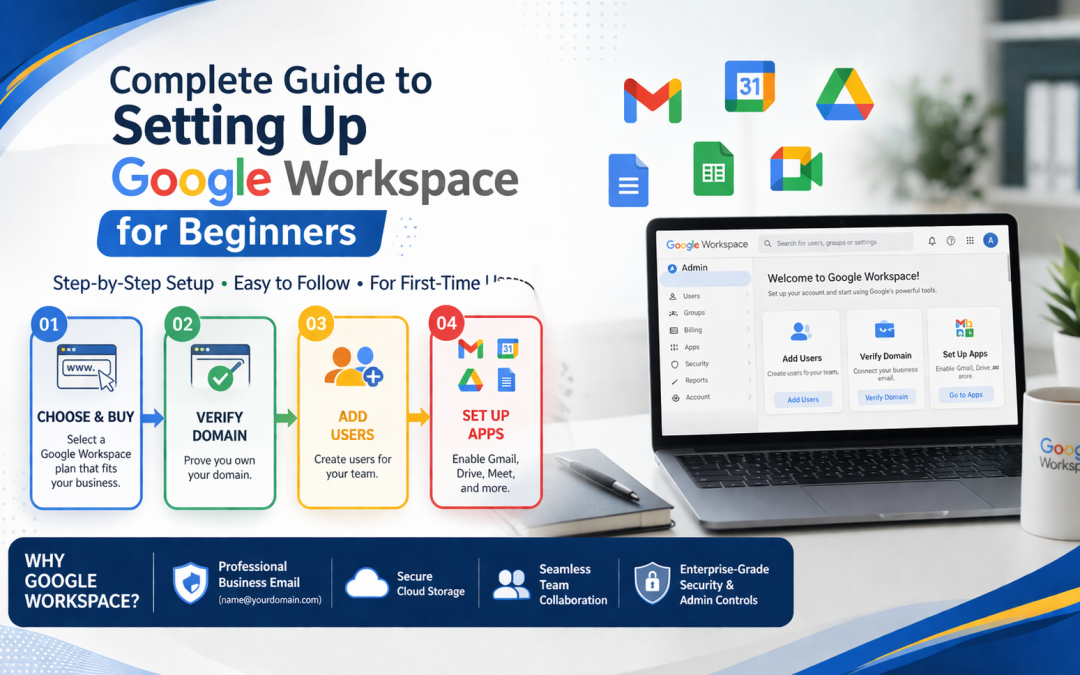
In the current digital world, businesses require efficient tools for communication, collaboration, and productivity. Google Workspace is the best option for businesses of different sizes, providing a professional email, cloud storage, collaboration tools, and security features. For newbies, Google Workspace setup might be a complex process, but with appropriate guidance, businesses can implement Google Workspace in a hassle-free way. In India, businesses require professional help for google workspace setup delhi.
Why Google Workspace is Ideal for Beginners
Google Workspace offers an integrated set of apps, which include Gmail, Google Drive, Google Docs, Google Sheets, Google Calendar, Google Meet, and Google Chat. This enables teams to effectively collaborate, even if they are not in the same location.
For newbies, Google Workspace is easy to use, learn, and scale. This means that businesses can get professional help for google workspace setup delhi, which will ensure that the setup is done properly and will not experience any technical issues.
Step 1: Assess Your Business Requirements
Prior to the process, assess your organization’s needs. This includes the number of users, storage, collaboration tools, and security.
Proper assessment will help you choose a Google Workspace plan that suits your current and future needs. Seeking help from experts for google workspace setup delhi can help beginners understand which plan best suits them and how they can efficiently manage costs.
Step 2: Choose the Right Google Workspace Plan
Google Workspace comes with a range of plans, namely Business Starter, Business Standard, Business Plus, and Enterprise. These plans come with varying storage capacity and features.
It is often difficult for a beginner to select a plan. By opting for professionals at google workspace setup delhi, businesses can select a plan that meets their requirements and does not involve any additional cost.
Step 3: Register and Verify Your Domain
A domain is necessary for a professional email service. If a business already has a domain, it must be verified by Google Workspace. For businesses without a domain, service providers can assist in the purchase and registration of a domain.
A domain verification ensures that email accounts are securely connected to a business domain. Professional guidance for google workspace setup delhi helps avoid delays or errors during this step.
Step 4: Create User Accounts
After verifying the domain, user accounts need to be created for all employees. Each account will have a professional email address and will allow employees to use Google Workspace services like Gmail, Drive, Docs, Meet, etc.
Effective management of user accounts is critical for security, efficiency, and communication. Even new users can benefit from expert guidance for google workspace setup delhi.
Step 5: Configure MX Records and DNS Settings
Additionally, the Mail Exchange (MX) records must be set up to route emails to Google Workspace servers. Failure to set up these records correctly can cause email communication problems.
Expert help for Google Workspace setup in Delhi ensures that the MX records are correctly set up, thereby ensuring smooth email communication without interruptions.
Step 6: Migrate Existing Emails and Data
If businesses are moving from another email platform, they need to migrate their emails, contacts, and calendars. They should not lose any important information. The migration of data is an important step, and it needs accuracy.
Professional services for google workspace setup delhi use reliable tools for migrating all data, ensuring business continuity with zero data loss.
Step 7: Organize Cloud Storage and Shared Drives
Google Drive is a secure cloud storage service for files and documents. The configuration of shared drives and storage folder structures helps teams access their files easily and collaborate productively.
Novices may face difficulties in organizing storage correctly. Guidance from experts for google workspace setup delhi helps optimize storage structure and secure sharing of confidential information.
Step 8: Set Up Collaboration Tools
Google Docs, Google Sheets, Google Slides, and Google Meet offer real-time collaboration and project management. Proper configuration of these tools facilitates team collaboration and project management. This is particularly important for teams working remotely.
Professional advice ensures that all collaboration tools are configured properly and used by team members.
Step 9: Implement Security Measures
Security is a key concern for businesses, and Google Workspace offers robust security features, which include two-step verification, encryption, and administrative control.
Professional advice for Google Workspace Setup in Delhi can be useful for a beginner, as they can be guided on how to implement security features correctly, thereby keeping the business’s sensitive information out of unauthorized hands.
Step 10: Train Employees for Effective Usage
Employees can be trained to use the various tools offered by Google Workspace so that the team can use them effectively. This includes training on Gmail, Google Drive, Docs, Sheets, Slides, Meet, and Chat.
New employees can benefit from training programs offered by expert trainers. This can help them avoid mistakes and improve their productivity.
Step 11: Continuous Support and Maintenance
However, the setting up of Google Workspace is not a one-time task. It needs to be supported continuously for the management of users, resolving issues, updating the system, and optimizing it.
There are various service providers for the setting up of Google Workspace Delhi, which provide the necessary support for the smooth running of the system and the communication of businesses.
Benefits of Professional Google Workspace Setup
Increased Productivity
Teams can collaborate in real-time, manage projects efficiently, and streamline communication
Professional Email
Custom domain email addresses enhance credibility with clients and partners
Enhanced Security
Advanced security features protect sensitive business data from cyber threats
Cost Optimization
Selecting the right plan ensures cost-effective deployment based on company size and requirements
Scalability
Google Workspace grows with your business, allowing easy addition of users and storage upgrades
Common Challenges for Beginners and How to Overcome Them
Beginners may face challenges such as incorrect DNS settings, slow data migration, or misconfigured user permissions. These issues can cause delays and disrupt workflow.
Working with experts for google workspace setup delhi helps avoid these problems. Professional guidance ensures accurate setup, proper migration, and secure configuration.
Future Benefits of Google Workspace
Once set up correctly, Google Workspace is the hub for all communication and collaboration in a business. It ensures businesses stay competitive with continuous updates, new features, and improved security.
Newbies get continuous support and expert advice to ensure they get the most out of Google Workspace and run their businesses smoothly.
Conclusion
Setting up Google Workspace for the first time can be a daunting task, but by following a systematic approach and proper planning, a beginner can implement it efficiently and securely. Starting from assessing business requirements and choosing the best plan to configuring emails, migrating data, and securing it, every step is crucial to a successful implementation.
Seeking professional help for the implementation of google workspace setup delhi is the best option as it ensures proper configuration, minimal business downtime, and maximum usage. A proper implementation of Google Workspace can boost business productivity, communication, collaboration, and security, helping businesses achieve growth and success.
GoogleWorkspace #GoogleWorkspaceSetup #GoogleWorkspaceDelhi #WorkspaceSetupDelhi #BusinessEmail #CollaborationTools #CloudSolutions #DigitalWorkspace #GSuiteDelhi #OfficeProductivity